Welcome to Seal Report & Task
Seal Report & Task offers a complete framework for producing daily reports from any database or any No SQL source, and to perform complex tasks.
The product focuses on easy installation and report design: Once setup, reports can be built and published in a minute.
Seal Report is an Open Source tool for Microsoft .NET entirely written in C#, free for everyone under the MIT License.

Main Features
- Dynamic SQL sources: Use either your SQL or let the Seal Engine build dynamically the SQL used to query your database.
- LINQ queries: Join and query any Data Sources (SQL, Excel, XML, Mongo DB, Olap Cube, HTTP JSon, etc.) with the power of LINQ queries.
- Native Pivot Tables: Simply drag and drop elements directly in a pivot table (Cross Tab) and display them in your report.
- HTML5 Charts: Define and display Chart Series in two mouse clicks (Support of ChartJS, ECharts, Plotly, ScottPlot and Gauge libraries).
- Maps: Display the rows of a model having a latitude and a longitude on an interactive map, with colors, sizes and popups (OpenStreetMap, OpenTopoMap, OpenHikingMap, IGN or your own tiles).
- AI Agents: Chat with role-based AI agents to design reports, analyze data, manage data sources, schedule executions or administer the server — using your own provider (OpenAI, Azure OpenAI, Anthropic or Ollama, including local models). AI tasks can also be embedded in reports.
- Fully Responsive and HTML Rendering using Razor engine: Use the power of HTML5 in the report result (Bootstrap layout, Responsiveness, Tables sorting and filtering). Customize your report presentation in HTML with the Razor engine parsing.
- Excel and PDF: Have a full control of your report result in Excel (use of ClosedXML library) or PDF (use of QuestPDF library). Several other formats are available (XML, Json, Text, CSV) or can be easily customized.
- KPI and Widget Views: Create and display your Key Performance Indicators in a single report.
- Web Report Server: Publish your reports on the web (Support of Windows and Linux OS with .NET).
- Fully Multilingual: Display the web interface and your report results in the language of your users — translations are provided for 28 languages, and any string can be customized or completed in the repository translation files.
- Report scheduler: Schedule your report executions and generate results in folders, FTP/SFTP servers or SharePoint document libraries, or send them by emails via SMTP, SendGrid or MS Graph (integrated with the Windows Tasks Scheduler or available as a service).
- Drill Down navigation and Sub Reports: Navigate in your report result to drill to a detail or to execute another report.
- Report Tasks & ETL: Define tasks to perform your ETL or batch operations (data load, excel load, file download from FTP or SFTP, zip, backup, data processing, etc.) or to trigger procedures from external assemblies.
- Native support of Mongo DB.
- NuGet packages to ease integration into existing projects.
- Low TCO (total cost of ownership): The product is designed for minimal ongoing maintenance.
Live Demonstration
A live demonstration of the Web Report Server is available at SealReport.org/demo.Requirements and License
- .NET 10.0 (Microsoft Windows Desktop Runtime 10)
- Database drivers: OLE DB, ODBC, MS SQL Server, Oracle, MySQL, SQLite, PostgreSQL, Mongo DB
- For the Report Designer: Microsoft Edge WebView2
- For the Web Report Server: ASP.NET Core Runtime 10 (Hosting Bundle) or greater
- Visual Studio 2026
License
Seal Report is free and open source for everyone under the MIT License.
Third-party components are distributed under their own licenses, see Third-Party Notices.
Professional support and services are available at Seal Report Services.
Installation and Compilation
Download
Get the last product releases and source codes at Github.Installation
Just run the setup executable file to install Seal Report on your computer.
The setup will install the Report Designer, the Server Manager, the Seal Scheduler Service and the Task Scheduler with a default repository.
All executables, libraries and configuration files are installed by default in C:\Program Files\Seal Report.
All repository files are installed by default in C:\ProgramData\Seal Report Repository.
Web Report Server Distribution:
The sub-folder C:\Program Files\Seal Report\Core contains the files required to publish the Web Report Server.
To publish the Web Report Server on Linux or Azure,
Compilation
Using Visual Studio, open the solution file Seal.sln located at the root directory.
The solution contains the following projects:
- SealLibrary: Main library shared by all the executables. This library contains the main classes in the Model sub-folder (like Report, MetaTable, Restriction, Task, etc.) plus some helpers.
- SealLibraryWin: Same library as SealLibrary but compiled for the Windows applications: Report Designer and Server Manager.
- SealReportDesigner: Report Designer executable (linked with SealLibraryWin).
- SealServerManager: Server Manager executable (linked with SealLibraryWin).
- SealTaskScheduler: Console application invoked by the Windows Task Scheduler to execute report in batch.
This application may also be executed by the Scheduler Service, the Scheduler Worker or the Web Server if the Windows Task Scheduler is not used. - SealWebServer: Asp.Net application for Web Report Server.
- SealSchedulerService: Seal Report Scheduler executable for the Windows Service.
- SealSchedulerWorker: Seal Report Scheduler executable as a Worker process (for non-Windows OS).
- Tests: Contains unitary tests and basic samples.
- TestWebApplication: A basic web application using the Seal Web Interface API.
- SealDocumentation: sealreport.org Web site.
NuGet Packages for SealLibrary
A NuGet package of SealLibrary has been published to ease the Seal Report integration into your own .Net projects: SealReportLibrary.NETCore.Overview
Entities and components
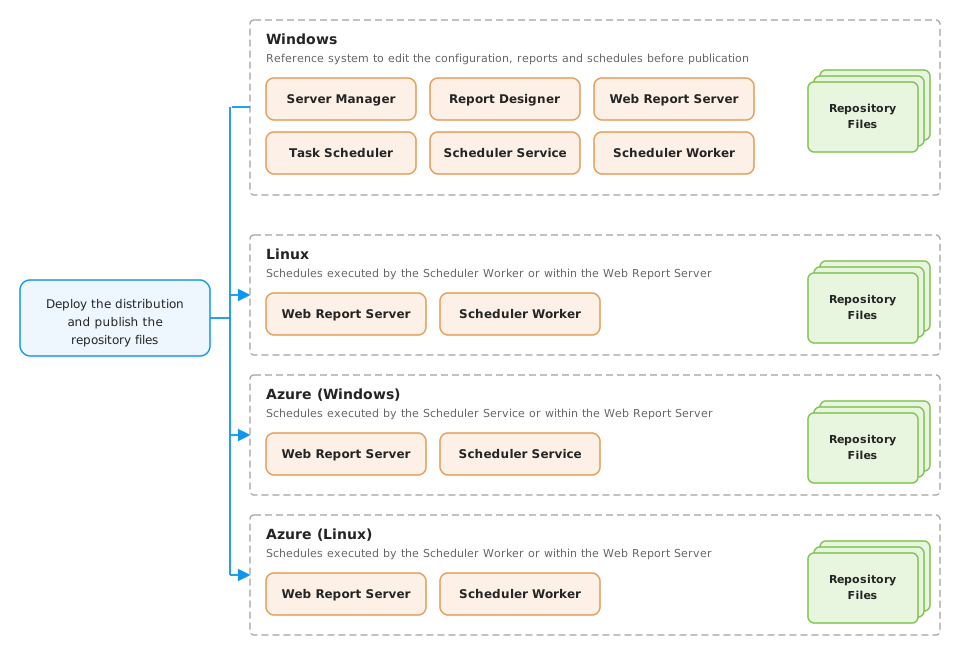
Features by distribution
| Platform | Server Manager | Report Designer | Task Scheduler | Scheduler Service | Scheduler Worker | Web Report Server |
|---|---|---|---|---|---|---|
| Windows | ✔ | ✔ | ✔ | ✔ | ✔ | ✔ |
| Linux | ✔ | ✔ | ✔ | |||
| Azure (Windows) | ✔ | ✔ | ||||
| Azure (Linux) | ✔ | ✔ |
Deployment and publication
Main Entities: Repository and Reports
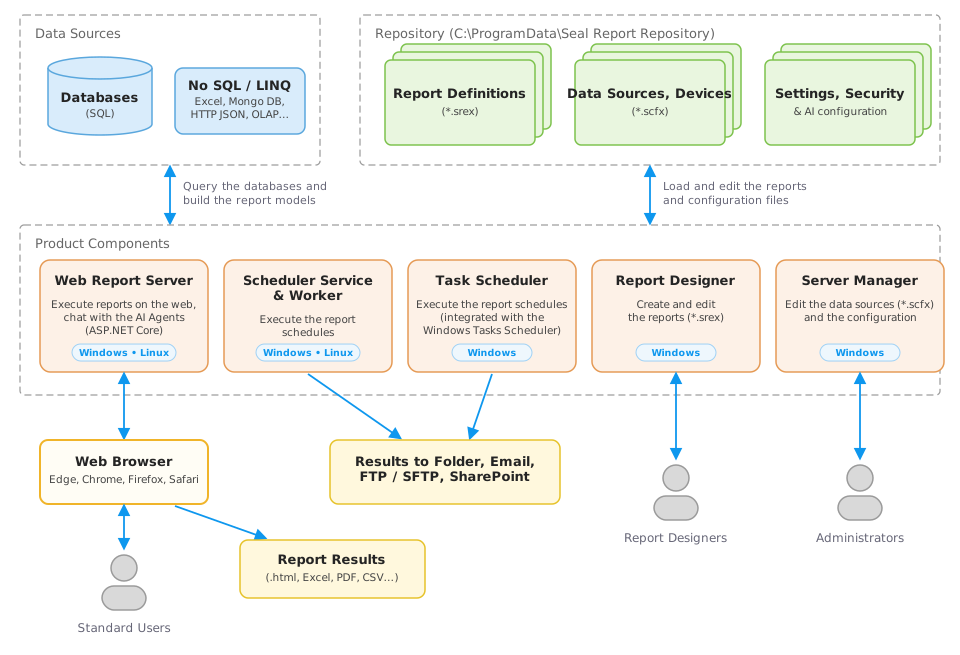
The Seal Repository stores all the entities managed by Seal Report: Data Sources, Devices, Reports.
In addition, the repository contains extra folders for the Settings (configuration and dictionary for translations), the Views (used to render report result), the Security (configuration and providers).
By default, the repository root folder is located in "C:\ProgramData\Seal Report Repository".
A report is composed of Data Sources, Models, Views and optional Tasks, Outputs and Schedules. The report may also reference Views Templates located in the repository.
- Data Sources contain the descriptions of database connections, tables, joins and columns.
- Models define how to generate the ResultSet (Data Table) and Series from a single SQL Statement.
- The Views are used to generate a HTML document from the Models using Razor parsing and rendering.
- Output and Schedule can be defined to automate report generation (e.g. Sending an Email every morning).
- Tasks may be defined to perform SQL or Script tasks.
Product Components
Seal Report is made of the following components:
- The Server Manager (a Windows application) edits repository Data Sources, Devices and is used to perform administrative tasks (checking sources and reports, publishing web site, configuring the server, editing the security, etc.).
- The Report Designer (a Windows application) to create, edit and execute reports.
- The Web Report Server (an ASP.Net application) allows the end-users to edit and execute the reports published from the Web.
- The Task Scheduler (a console application) is invoked by the Windows Task Scheduler to schedule report execution on a Device (folder or email).
- The Scheduler Service (a Windows Service application) to execute the report schedules defined in the repository (folder, file server or email).
- The Scheduler Worker (a .NET Worker Application) to execute the report schedules defined in the repository (folder, file server or email) on a non-Windows OS.
Repository Folders
Several sub-folders are located from the Repository Root folder. These folders contain all files necessary to run Seal Report.
- Assemblies: additional DLL (*.dll) that can be referenced in all Razor scripts. You can add your own assemblies in this folder and call them from any script compiled and executed during a report execution (e.g. in a Task). Only assemblies that do not reference the Seal library itself (e.g. a third-party or business library) should be stored here, as they are loaded by all Seal applications.
- Assemblies\Extensions\Net and Assemblies\Extensions\Win: extension assemblies built against a Seal library: Net for the assemblies referencing SealLibrary (Web Server, Scheduler, non-Windows runtime) and Win for those referencing SealLibraryWin (Windows applications). Only the sub-folder matching the running application is loaded at the repository initialization. Private dependencies of an extension can be copied next to it in the same sub-folder.
- Assemblies\Dynamics: additional source code files (*.cs) to be compiled and loaded. You can then reference the Classes compiled from any script (e.g. in a Task). The compiled assemblies are stored in the Net (non-Windows runtime) and Win (Windows applications) sub-folders.
- Assemblies\RazorCache\Net: Cache folder to store the assemblies compiled from static template files (Views, Tables and Tasks) for the .NET (non-Windows) runtime.
- Assemblies\RazorCache\Win: Cache folder to store the assemblies compiled from static template files (Views, Tables and Tasks) for SealLibraryWin (Windows applications).
- Databases: dedicated folder for local database files (e.g. an MS Access file, an Excel file).
- Devices: the device configurations (*.scfx) used by the report output. 4 types of devices are available: Folder, File Server (FTP, SFTP), SharePoint (Microsoft Graph), Email to send it to a user by SMTP, SendGrid or MS Graph.
- Logs: the daily log files (*.txt). All events, executions and schedules messages are logged in a daily file (files are auto-purged).
- Reports: the reports (*.srex), files and sub-folders published by the Web Report Server. The Reports root folder is the parent of all folders, files and reports published.
- Security: the security defined for the Web Report Server (Security.xml) and a sub-folder containing the security providers (*.cshtml) available.
- Settings: the Server configuration (Configuration.xml) and the translation files (*.xlsx or *.csv).
- Settings\AI: the AI Agents configuration (AIConfiguration.xml) defining the AI providers and agents.
- Settings\AI\Prompts: the system prompts (*.md) defining the role and the rules of each AI agent.
- Settings\AI\Samples: the sample prompts (*.md) proposed to the user in the chat panel for each AI agent.
- Settings\AI\Scripts: the Razor scripts (*.cshtml) implementing the tools available to the AI agents.
- Settings\AI\Skills: the skills (*.md) describing how an AI agent performs a specific task (e.g. building a report from metadata, managing a data source).
- Sources: the data source files (*.scfx) available for the reports. These data sources are shared amongst all the reports.
- Sources\TableTemplates: table templates (*.cshtml) referenced by No SQL tables defined in LINQ Data Sources.
- Sources\TaskTemplates: tasks templates (*.cshtml) referenced by Report Tasks defined in reports.
- SpecialFolders\Personal: dedicated folder to store personal folders for each user. The folder contains reports, files and the user's profile (_profile.xml).
- SpecialFolders\Schedules: report schedules (*.xml) when the Seal Report Scheduler is used. One file per schedule.
- SubReports: the sub-reports (*.srex) referenced by an element in a data source. Sub-Reports allow master-detail navigation from a report result.
- Views: the view templates (*.cshtml) used by the report views with their configuration and their related JavaScript, CSS and image files.
- Views\Renderers: the renderer templates (*.cshtml) used by the report views with their configuration to generate report results in a specific format.
Support: Need help ?
The product aims to be self-documented as a description is displayed for every field edited with the Report Designer or the Server Manager.
Use the Github Discussions to get free support, information and hints for the product.
Feel free to post your questions, comments or answers...
Give a Star on GitHub
It is free and takes one click: star the GitHub repository to increase the product visibility and help the community grow.Subscribe to professional support
The simplest way to support the product is to subscribe to professional support at Seal Report Services.Consulting: Get State of the Art Help
If you need professional consulting, trainings or workshops, please contact Ariacom.Pay for a new feature: Become a sponsor forever
If you need a new feature that could be used by the community and be part of the future product releases, please contact us at Ariacom or using GitHub.Check out the last requested product features at Github Discussions.
Credits
- Bootstrap 5 for the Web Report Server and report rendering
- Font Awesome 6 for the icons
- RazorEngineCore for the rendering and dynamic options
- OpenAI .NET library and Azure.AI.OpenAI for the AI providers
- ChartJS for the charts JS
- ChartJS Labels Plugin for the charts JS Labels
- Apache ECharts for the ECharts charts and the Gauges
- Leaflet for the Map view
- Plotly for the Plotly charts
- ScottPlot to generate ScottPlot charts
- ScintillaNET for the source code editor
- DiffPlex to generate textual differences
- Dynamic Properties for PropertyGrid helpers
- MimeKit for Email devices
- Data Tables to enhance HTML tables
- Flatpickr datetime picker component for the report restrictions
- Bootstrap Select multiple select component for the report restrictions
- Fluent FTP library for Output File Server with the FTP protocol
- SSH.NET library for Output File Server with the SFTP and SCP protocol
- SharpZipLib to Zip report result files
- ClosedXML to generate and process Excel files.
- QuestPDF to generate the PDF result. Please check if your usage of QuestPDF requires a license.
- Puppeteer-sharp to generate the HTML to PDF result, with an unbranded Chromium build downloaded at the first execution in the Assemblies\Chromium Repository sub-folder
- InnoSetup for the setup
- Sand Castle Help File Builder for the documentation generation
Contribute to Seal Report
Give a Star!
You like Seal Report? The simplest contribution takes one click: star the project on GitHub to increase its visibility and help the community grow.Enhance the documentation and samples
Want to share your experience or to add a new topic ? Something is not clear in the documentation ? Do you have an interesting recipe ?As the site for the documentation is part of the solution, you are welcome to Pull a Request at GitHub.
Sponsor the project
If you are using Seal Report in a business application, please consider to sponsor the product to ensure its maintenance, quality and independence.Please check Support and Sponsor.
And more...
You are also welcome to help us in several different areas:- Beta testing.
- Libraries of Data Sources and Reports on standard databases.
- Additional View templates.
- New features development.